

If you want a real career in design, you need to master the best graphic design software in the field. It includes Photoshop, Illustrator, InDesign, Figma, and a few others. These programmes turn your ideas into work that clients actually pay for. Hence, learning them well is the foundation of everything else.
The good news? You do not need all of them at once. You can start with one or two. Then, you can add the rest as your skills grow.
The global graphic design market is projected to reach around 59.29 billion US dollars in 2026, according to industry data. So the effort you put into learning the right tools pays back directly in opportunities.
What Software Skills Does a Graphic Designer Need?
At its heart, a designer handles three kinds of work:
- Image editing: retouching photos & building raster-based visuals.
- Vector work: creating logos and icons that scale to any size cleanly.
- Layout: arranging text and images into polished pages and documents.
Learning the right graphic design software for each of these three jobs is what separates a hobbyist from a professional.
Beyond these, modern designers increasingly need interface and prototyping skills too. Digital products now drive a huge share of the work, so screen-design tools matter more each year. Still, you do not have to master everything. A strong grip on the core three, plus one interface tool, already makes you employable.
7 Must-Learn Software for Graphic Designers
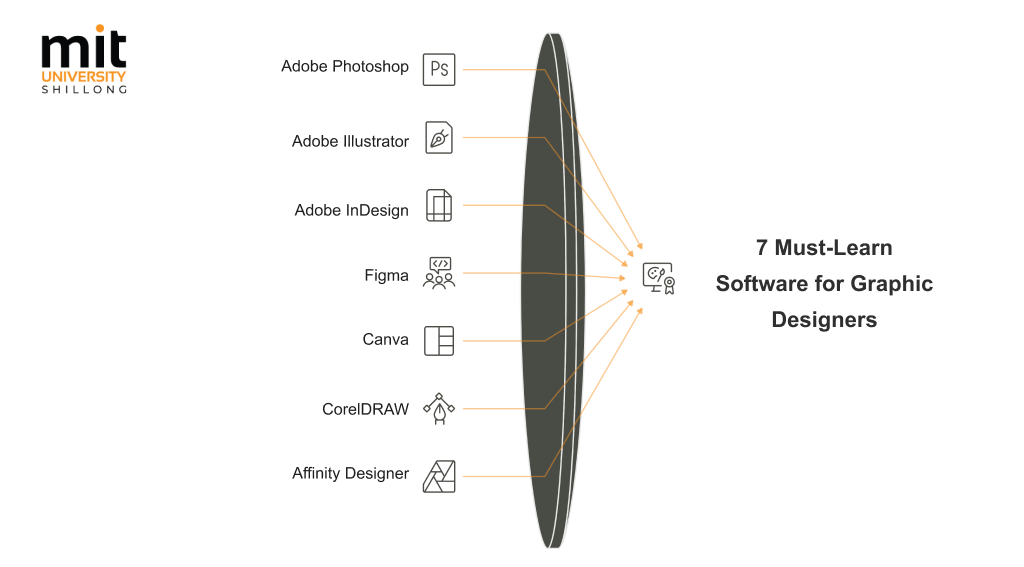
These seven tools cover almost every kind of design work you will ever meet.
- Adobe Photoshop
It’s the industry standard for photo editing and raster graphics. You will use it to retouch images, build digital art, and craft detailed web visuals. Almost every studio expects at least working Photoshop skills, so it belongs near the top of your list.
- Adobe Illustrator
It is the go-to for vector work like logos, icons, and illustrations. Because vectors scale to any size without losing quality, Illustrator is essential for branding and print. Master it, and you can design a logo that looks sharp on a business card & a billboard alike.
- Adobe InDesign
The leader for multi-page layouts such as magazines, brochures, & reports. It handles text flow, columns, and master pages far better than any other tool. If you plan to work in publishing or editorial design, this one is non-negotiable.
- Figma
It is the default for UI, UX, and collaborative interface design. It runs in your browser so that teams can design and comment together in real time. With digital products booming, Figma has quickly become one of the most in-demand skills.
- Canva
It gives the fastest route to clean social media and marketing graphics. Its template-driven approach lets beginners produce polished work almost immediately.
- CorelDRAW
A strong vector alternative, popular in print, signage, and packaging work. Many established print businesses still run on it, so the skill stays valuable.
- Affinity Designer
It is a one-time-purchase option that rivals the Adobe suite. For students on a budget, it offers vector and raster tools without a monthly fee.
Treat this list as your roadmap, not a set of boxes to tick overnight.
What Can You Create With Each Tool?
Each tool shines at a particular kind of output, and knowing that saves you real time.
| Software | Best for | Type | Learning curve | Cost model | Ideal user |
| Adobe Photoshop | Photo editing, digital art, web visuals | Raster | Moderate | Subscription | Editors, digital artists |
| Adobe Illustrator | Logos, icons, infographics | Vector | Moderate | Subscription | Brand and print designers |
| Adobe InDesign | Magazines, brochures, reports | Layout | Moderate | Subscription | Publishing, editorial designers |
| Figma | UI, UX, prototypes | Interface | Easy to moderate | Free / subscription | Product and web designers |
| Canva | Social and marketing graphics | Template | Very easy | Free / subscription | Beginners, marketers |
| CorelDRAW | Print, signage, packaging | Vector | Moderate | One-time / subscription | Print and signage pros |
| Affinity Designer | Vector and raster combined | Hybrid | Moderate | One-time purchase | Budget-conscious students |
The tool you reach for should always follow the job in front of you.
Which Software Should Beginners Learn First?
Start with the best software for creating graphics that matches the work you want to do most. For most beginners, that means this order:
- Canva builds your eye for layout and colour without a steep learning curve.
- Photoshop then teaches the deeper editing skills that serious design demands.
- Illustrator follows naturally, giving you the vector control that branding needs.
This gentle sequence keeps you motivated, since you produce real work early. Many strong graphic design colleges in Guwahati follow a similar build-up in their own curriculum.
Here is a quick comparison to help you choose your starting point.
| Learning order | Software |
| Start here | Canva |
| Next | Photoshop |
| Then | Illustrator |
Common Mistakes Beginners Make When Learning Design Software
Most early struggles come from a few avoidable habits:
- Learning too many tools at once
It feels productive to open Photoshop, Illustrator, and Figma at once. However, it scatters your focus. You end up mediocre at everything and skilled at nothing, so commit to one tool until it feels natural.
- Watching endless tutorials without practising
Tutorials are comforting because they give the illusion of progress. Nevertheless, knowledge sticks only when you make mistakes and fix them yourself. Hence, you should pause the video and rebuild each step.
- Chasing advanced features too early
Beginners love jumping to fancy effects and plugins before the basics are solid. This leaves shaky foundations, so master core tools like layers, shapes, and the pen before anything flashy.
- Ignoring the fundamentals
Many assume learning the software is enough. However, typography, colour, spacing, and hierarchy decide whether a design works. You should study these principles as well.
How to Practice and Improve Your Software Skills
Steady, deliberate practice beats occasional bursts of effort every single time. The most reliable way forward is to set yourself small projects each week, like redesigning a poster or rebuilding a favourite app screen.
A few habits that genuinely speed up your progress:
- Copy work you admire to see how professionals build their designs.
- Set daily mini-challenges, such as one icon or one banner a day.
- Join design communities where members critique and sharpen each other’s work.
- Learn keyboard shortcuts, since speed frees you to focus on creativity.
- Redo old projects every few months to measure how far you have come.
The strong reputation of graphic design colleges in Assam rests partly on this project-led approach. So build practice into your routine, and treat every small project as a step forward.
Building a Portfolio With Your Design Projects
Your portfolio matters more than your certificates, since it proves what you can build with your graphic design software in practice. Employers want to see what you actually make, not just which courses you finished.
The numbers back this up. Figma proficiency now appears in 67% of design job listings, which shows how much practical tool skill drives hiring today.
When you build yours, keep these rules in mind:
- Show range: include a logo, a layout, a social campaign, and an interface design.
- Choose quality over quantity: six strong pieces beat twenty weak ones.
- Explain your thinking: clients value how you solve problems, not just the result.
So treat your portfolio as a living showcase, and refresh it as your skills sharpen.
Turn Your Software Skills Into a Career
Learning the right tools is the surest way into a creative profession, so pick one and begin today.
- Choose one programme from the list above and commit to it for a month.
- Build one real project a week to lock in what you learn.
- Add the next tool as your confidence grows, steadily expanding your digital graphic design range.
If you are serious about turning this passion into a profession, a structured design programme at MIT University Shillong can give you the guidance, mentorship, and portfolio support to get there faster. Explore the course, speak to the faculty, and take your first real step toward a design career this season.
What are the best career options after B.Des?
Popular paths include fashion designer, graphic designer, animator, product designer and UI/UX designer. Many graduates also freelance or start their own studios. The best option usually matches your strengths and the portfolio you build during the course.
Which industries hire B.Des graduates?
Advertising agencies, product startups, e-commerce brands, gaming and media studios, manufacturing, hospitality and tech companies all hire design talent. At MIT Shillong, recruiters range from Lenskart and Zouk to Ola Electric and TCS.
What kind of jobs after B.Design Graphics are most popular?
Why choose graphic design as a career in today’s world?
Every brand, app and startup needs designers, so demand is steady and rising. It also offers freelance potential and clear routes into higher-paying fields like UI/UX and motion, making it one of the most future-proof creative choices.
Leave a Reply